discli: A Discord CLI Built for AI Agents (and Humans Too)
AI agents are getting really good at writing code, managing files, and browsing the web. But when it comes to interacting with platforms like Discord, they hit a wall. There’s no clean way to send a message, moderate a server, or listen for events without spinning up a full bot framework, wiring up event handlers, and dealing with async Python boilerplate.
That’s why I built discli. It’s a command-line tool that gives you (and your AI agents) full access to Discord from the terminal. No bot framework needed. No event loop to manage. Just simple, composable commands that work the way CLI tools should.
Why a CLI for Discord?
If you’ve ever built a Discord bot, you know the drill. You write a Python script with discord.py, set up intents, register event handlers, manage the async lifecycle, and deploy it somewhere that stays online. For a persistent bot, that makes sense. But what if you just want to send a quick message? Or search through channel history? Or let an AI agent respond to mentions?
The traditional bot approach is overkill for those use cases. What you actually want is something like curl but for Discord. Fire a command, get a result, move on.
That’s exactly what discli does.
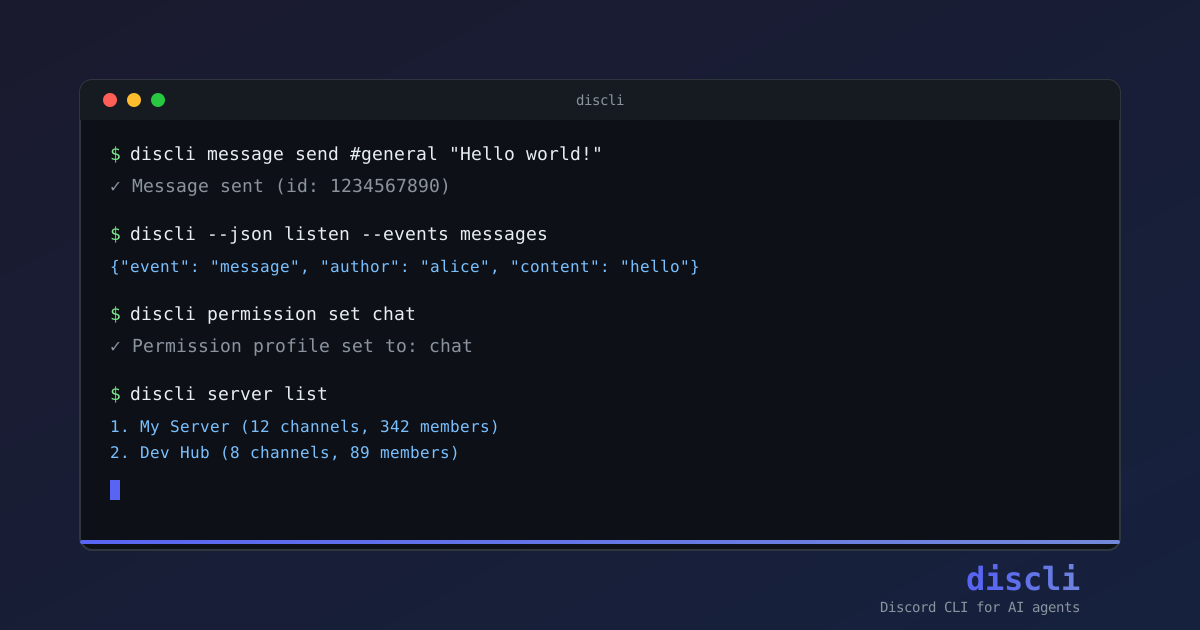
discli message send #general "Hello world!"
discli message list #general --limit 20
discli message search #general "bug report" --limit 100
Every command runs, does its thing, and exits. No persistent connection required (unless you want one). And every command supports --json output, which means piping results into jq, logging to files, or feeding them into an AI agent is trivial.
How It Works
Under the hood, discli uses discord.py to connect to the Discord API through a bot token. But instead of keeping a long-running connection, most commands follow a fire-and-exit pattern. Connect, execute the action, disconnect. It keeps things fast and predictable.
The one exception is discli listen, which maintains a WebSocket connection to stream events in real time. This is where the AI agent integration gets interesting, but more on that in a minute.
Setting it up takes about 30 seconds:
pip install discord-cli-agent
discli config set token YOUR_BOT_TOKEN
That’s the whole setup. You need a bot token from the Discord Developer Portal, but once you have that, you’re good to go.
What You Can Actually Do
discli covers pretty much everything you’d want to do on Discord from the terminal.
Messages are the core. Send, list, search, reply, edit, delete. You can filter by date ranges, search by content and author, and pull deep history with backfill commands.
discli message send #general "Check this out" --embed-title "News" --embed-desc "Big update"
discli message search #general "help" --author alice --after 2026-03-01
discli message history #general --days 7
Channels and threads work just as smoothly. Create text or voice channels, spin up threads from messages, and manage them without ever opening the Discord app.
discli channel create "My Server" new-channel --type text
discli thread create #general 123456789 "Support Ticket"
Moderation is fully supported too. Kick, ban, unban, role management, the works. And because these are destructive actions, discli asks for confirmation by default.
$ discli member kick "My Server" spammer
Warning: Destructive action: member kick (spammer from My Server). Continue? [y/N]
You can also send DMs, manage reactions, control typing indicators, and list server info. If Discord’s API supports it, discli probably has a command for it.
The AI Agent Angle
Here’s where discli really shines. The listen command streams Discord events as JSONL, which means any program (or agent) can consume them.
discli --json listen --events messagesThis outputs one JSON object per event. An AI agent can read this stream, decide how to respond, and fire back with discli message reply. The whole loop looks like this:
discli --json listen --events messages | while read -r event; do
  mentions_bot=$(echo "$event" | jq -r '.mentions_bot')
  if [ "$mentions_bot" = "true" ]; then
    channel_id=$(echo "$event" | jq -r '.channel_id')
    message_id=$(echo "$event" | jq -r '.message_id')
    discli message reply "$channel_id" "$message_id" "Hello! How can I help?"
  fi
done
That’s a working Discord bot in a bash script. No Python, no framework, no deployment headaches.
For more sophisticated setups, discli ships with example agents including a Claude Agent SDK integration that gives you a persistent, intelligent support agent with just a few lines of Python:
pip install discord-cli-agent claude-agent-sdk
python examples/claude_agent.py
There’s also a full command reference file at agents/discord-agent.md that you can drop into any AI agent’s system prompt. It works with Claude, OpenAI, LangChain, or whatever framework you’re using. The agent gets a complete understanding of every command available, and it can start managing your Discord server immediately.
Security That Doesn’t Get in the Way
Giving an AI agent access to Discord is a bit scary if you think about it. It could kick members, delete channels, or spam messages if something goes wrong. discli handles this with a few layers of protection that are strict enough to prevent disasters but flexible enough to not slow you down.
Permission profiles let you restrict what commands are available:
| Profile | Can Send | Can Delete | Can Kick/Ban | Can Manage Channels |
|---|---|---|---|---|
full | Yes | Yes | Yes | Yes |
moderation | Yes | Yes | Yes | Yes |
chat | Yes | No | No | No |
readonly | No | No | No | No |
Running an AI agent? Set it to chat mode so it can send messages and react but can’t accidentally nuke your server.
discli permission set chatConfirmation prompts catch destructive actions before they execute. Every kick, ban, and delete asks “are you sure?” unless you explicitly pass --yes for automation.
Rate limiting is built in. Destructive actions are capped at 5 calls per 5 seconds, which prevents your bot from getting banned by Discord’s API and protects against runaway agents.
Audit logging records every destructive action to ~/.discli/audit.log. If something goes wrong, you can trace exactly what happened.
discli audit show --limit 20User permission checking adds another layer. When an AI agent acts on behalf of a Discord user, you can verify that the triggering user actually has the required permissions:
discli member kick "My Server" target --triggered-by 123456789Smart Identifier Resolution
One of those small details that makes a big difference: discli accepts both IDs and human-readable names everywhere. You can reference a channel as #general or 123456789. A member as alice or their user ID. A server by name or snowflake. It figures out what you mean.
This matters a lot for AI agents, which might get a channel name from a user’s message but need to pass it to a command. No lookup step required.
The Tech Stack
discli is written in Python and weighs in at a clean, focused codebase. The architecture is straightforward:
- Click for the CLI framework
- discord.py for the Discord API
- Async wrapper that handles the connect/execute/disconnect lifecycle
- Security module for permissions, rate limiting, and audit logging
Everything lives in a single src/discli/ directory with clear separation between commands, client logic, config, and security. It’s the kind of codebase you can read in an afternoon.
Who Is This For?
AI agent builders who want their agents to interact with Discord without writing a full bot. Drop the command reference into your agent’s context and it can start managing servers immediately.
Developers who want quick access to Discord from the terminal. Search messages, manage channels, automate workflows with shell scripts.
Community managers who want to script moderation tasks. Batch operations, scheduled messages, audit trails for accountability.
Anyone who thinks Discord should be as scriptable as the rest of their toolchain.
Get Started
pip install discord-cli-agent
discli config set token YOUR_BOT_TOKEN
discli server list
Three commands and you’re in. Check out the GitHub repo for the full documentation, example agents, and the agent instruction file.
discli is open source under the MIT license. If you’re building AI agents that need to talk to Discord, or if you just want a faster way to manage your servers, give it a try. I’d love to hear what you build with it.
Links:

Rohit Kushwaha
Software Engineer & Tech Enthusiast
I'm a software engineer with a passion for building things that live on the internet. I write about technology, software development, and my experiences in the tech industry.